Vanity 103 HD filters
Re: Vanity 103 HD filters
Another graph bump, but in the meantime, I'm interested in hearing user preferences between the sharp and the slow rolloff.
Re: Vanity 103 HD filters
Hi there,
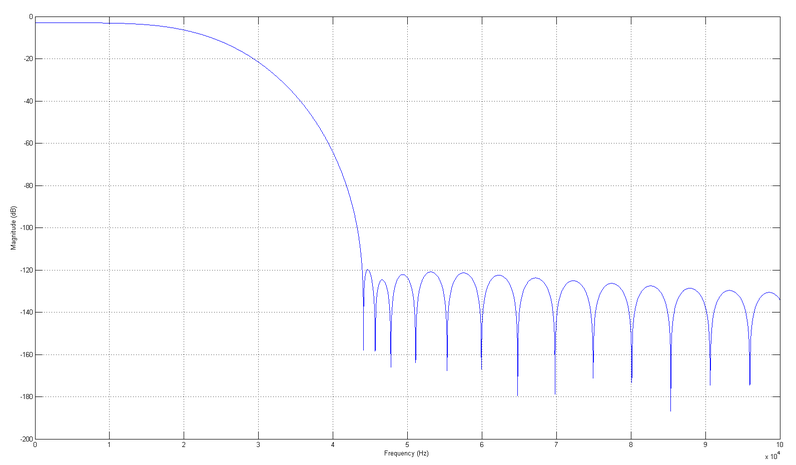
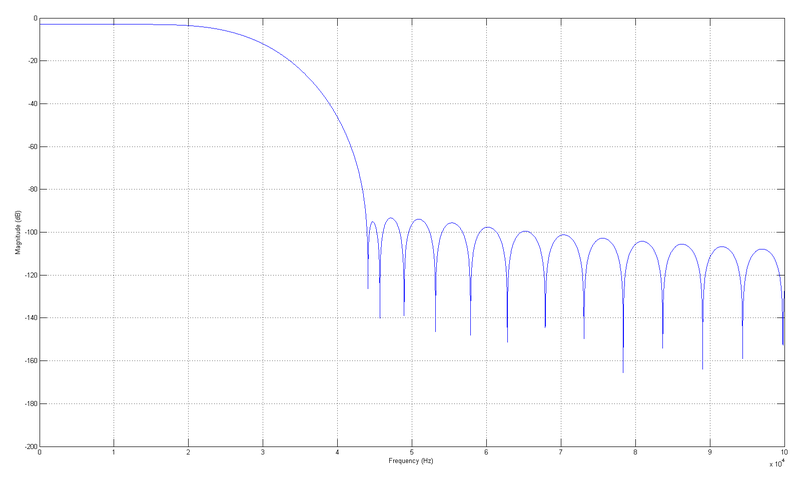
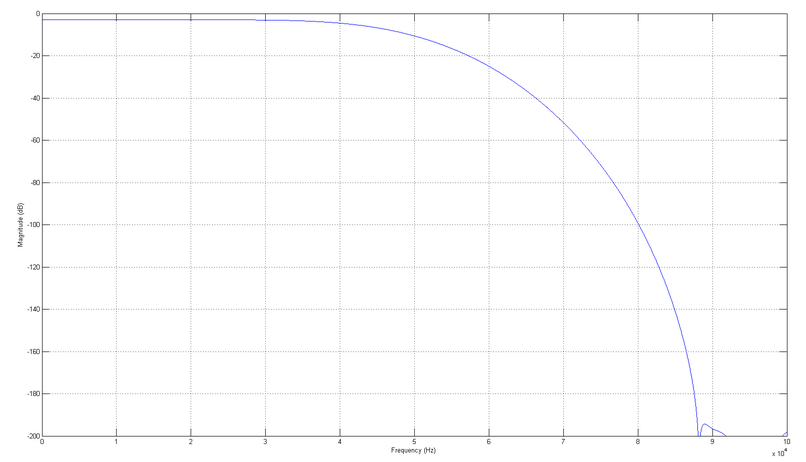
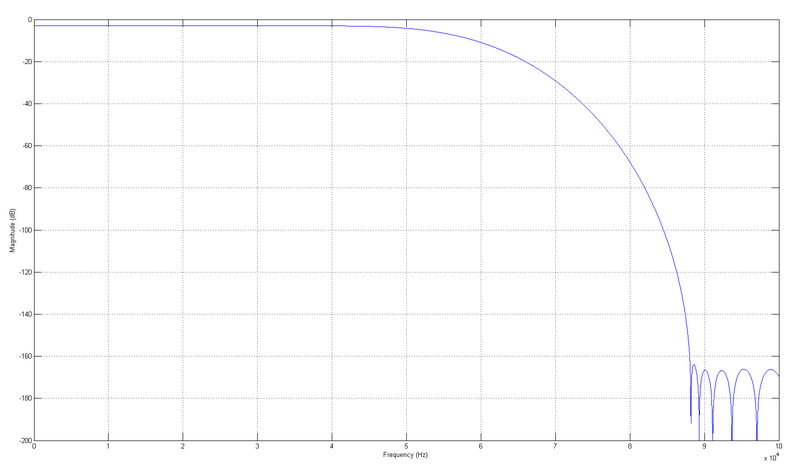
Finally I had some time to play around with the filters again and export the plots. The order of the filters below is #1,#2,#3 and #4. As described in the manual, #1 and #2 are sharp and slow filter for 88.2kHz sampling frequency, #3 and #4 are sharp and slow for 176.4kHz.
#1
#2
#3
#4
Please feel free to ask further questions.
Regards,
Pavel
Finally I had some time to play around with the filters again and export the plots. The order of the filters below is #1,#2,#3 and #4. As described in the manual, #1 and #2 are sharp and slow filter for 88.2kHz sampling frequency, #3 and #4 are sharp and slow for 176.4kHz.
#1
#2
#3
#4
Please feel free to ask further questions.
Regards,
Pavel
Re: Vanity 103 HD filters
Thank you for the graphs, Pavel.
I’m hearing the best sound using the filter with the 25kHz corner frequency (slow at 88.2). If what I’ve read is correct, DSD 64 has large HF noise beginning somewhere between 24-30khz, so the 25kHz filter would also objectively make the most sense, as it appears to be the closest to allowing the widest bandwidth of music while still filtering out all if not almost all the hf noise associated with the sacd DSD signal. Is this your understanding, as well?
Regarding the jitter settings, I am getting good results with 6 off and 7 on. Do you know why that particular combination would be so effective?
Thanks for all the insight,
Michael
I’m hearing the best sound using the filter with the 25kHz corner frequency (slow at 88.2). If what I’ve read is correct, DSD 64 has large HF noise beginning somewhere between 24-30khz, so the 25kHz filter would also objectively make the most sense, as it appears to be the closest to allowing the widest bandwidth of music while still filtering out all if not almost all the hf noise associated with the sacd DSD signal. Is this your understanding, as well?
Regarding the jitter settings, I am getting good results with 6 off and 7 on. Do you know why that particular combination would be so effective?
Thanks for all the insight,
Michael
Re: Vanity 103 HD filters
Hi Mjay71,
The filter bandwidth really depends on how well the downstream devices (DAC, amp, etc) can cope with elevated high frequency noise levels. Remember, filtering is always a trade-off between frequency and time domain properties. In layman's words, narrow filter should give you cleaner signal without HF rubbish at the expense of longer impulse response. Wide filter keeps the impulse short, but with more noise. Once the signal gets converted to analogue there is 100 and one things that can happen to the signal before it arrives to your ears. So the theory is great, but you should still try which filter sounds the best
Switches 6 and 7 alter some synchronization elements of the SPDIF stream - make them less or much more frequent to move them away from audio band. If you get better results with one particular setting, which is different from default, it may mean that your DAC is slightly sensitive to data jitter. And this is exactly the reason why this option is available.
Regards,
Pavel
The filter bandwidth really depends on how well the downstream devices (DAC, amp, etc) can cope with elevated high frequency noise levels. Remember, filtering is always a trade-off between frequency and time domain properties. In layman's words, narrow filter should give you cleaner signal without HF rubbish at the expense of longer impulse response. Wide filter keeps the impulse short, but with more noise. Once the signal gets converted to analogue there is 100 and one things that can happen to the signal before it arrives to your ears. So the theory is great, but you should still try which filter sounds the best
Switches 6 and 7 alter some synchronization elements of the SPDIF stream - make them less or much more frequent to move them away from audio band. If you get better results with one particular setting, which is different from default, it may mean that your DAC is slightly sensitive to data jitter. And this is exactly the reason why this option is available.
Regards,
Pavel